
Standalone
Run agentdesktop from local YAML, discover AI developer tools, and connect directly to an inference gateway without a fleet controller.
In standalone mode, the agentdesktop daemon reads local YAML and reconciles developer-tool settings on one device. It does not enroll the device or connect to the fleet controller.
The repository’s standalone example runs Dex and Agentgateway locally. agentdesktop signs the user in through OIDC, configures Claude Code to use Agentgateway as its Anthropic base URL, and supplies the resulting access token through Claude’s credential helper.
Prerequisites
- Docker with Compose.
- Claude Code and
agentdesktoponPATH. - An Anthropic API key for the example Agentgateway upstream.
- A local clone of the agentdesktop repository for the checked-in example files.
Download the current device binary from GitHub Releases, or follow Build and install to build from source. If you use a release binary, clone the repository separately and run the remaining commands from its root:
git clone https://github.com/agentdesktop-dev/agentdesktop.git
cd agentdesktop
The checked-in configuration enables both Claude Code and Claude Desktop. Claude Desktop cannot be configured in --user mode, so create a Claude-Code-only copy for the user-mode steps below:
cp examples/standalone/config.yaml /tmp/agentdesktop-standalone.yaml
In /tmp/agentdesktop-standalone.yaml, remove or comment out this active block:
claudeDesktop:
  useInferenceGateway: true
Start the example services
From the repository root, start Dex on 127.0.0.1:5557 and agentgateway on 127.0.0.1:4001:
export ANTHROPIC_API_KEY=sk-ant-...
docker compose -f examples/standalone/compose.yaml up -d
Wait for both services before starting the daemon:
curl --fail --silent --show-error \
  --retry 10 --retry-all-errors --retry-delay 1 \
  http://127.0.0.1:5557/dex/.well-known/openid-configuration \
  > /dev/null && echo "Dex is ready"

curl --fail --head --silent --show-error \
  --retry 10 --retry-all-errors --retry-delay 1 \
  http://127.0.0.1:4001/ \
  > /dev/null && echo "agentgateway is ready"
The HEAD / reachability route is defined by the example’s agentgateway.yaml.
Preview the configuration
Run a dry-run before changing Claude Code settings:
agentdesktop daemon \
  --config /tmp/agentdesktop-standalone.yaml \
  --user \
  --dry-run
The report shows each proposed update and conflict without writing files. In --user mode, Claude Code values are merged into ~/.claude/settings.json while unrelated settings are preserved.
Run the daemon
Start the daemon without --dry-run and leave it running:
agentdesktop daemon \
  --config /tmp/agentdesktop-standalone.yaml \
  --user
The browser opens for sign-in. Use admin@example.com and password with the checked-in Dex configuration.
In another terminal, verify the local daemon:
agentdesktop status
ok
And run the discover command to discover installed agents:
agentdesktop discover
Here’s how the output might look:
codex   unknown version /opt/homebrew/bin/codex
claude-code     2.1.231 /Users/user/.local/bin/claude
claude-desktop  1.25927.0       /Applications/Claude.app/Contents/MacOS/Claude
vscode  1.131.0 /opt/homebrew/bin/code
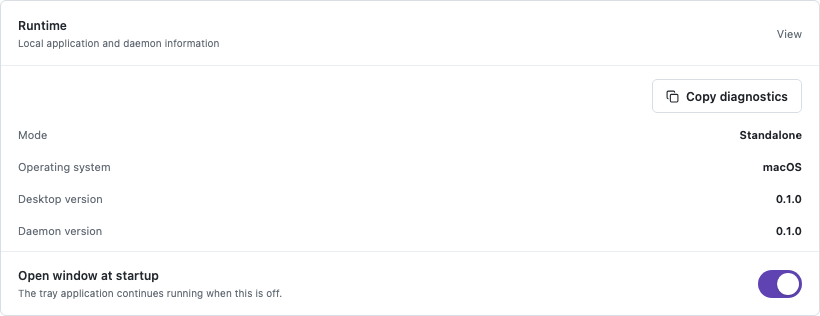
The optional desktop app shows the same local state. Run agentdesktop, then open Runtime under Status to confirm that the daemon is running in standalone mode and that the desktop and daemon versions match.
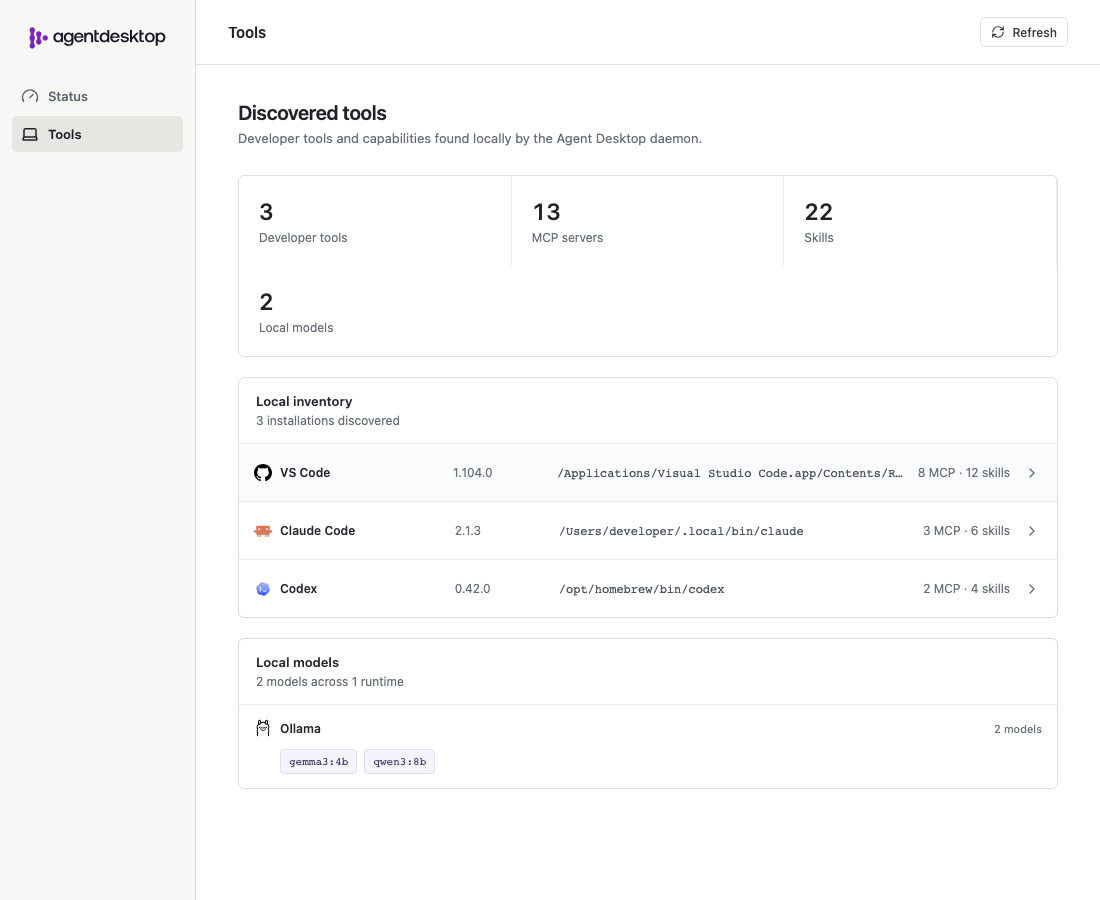
Open Tools to inspect the discovered developer tools, MCP servers, skills, and local models reported by the daemon.
Launch claude normally. Claude Code connects directly to agentgateway using the base URL written by agentdesktop. Its credential helper asks the daemon for the user’s OIDC access token.
Claude Desktop managed configuration requires system mode. Stop the user-mode daemon with Ctrl-C before switching modes. The original checked-in configuration already enables Claude Desktop, so run it as root:
sudo "$(command -v agentdesktop)" daemon \
  --config examples/standalone/config.yaml
Stop the example
Stop the foreground daemon with Ctrl-C, then stop Dex and agentgateway:
docker compose -f examples/standalone/compose.yaml down
rm -f /tmp/agentdesktop-standalone.yaml
The checked-in configuration and identity provider are for local development. Use your own OIDC client, trusted HTTPS endpoints, gateway policy, and secret management for a real deployment.