Production deployment
Deploy an agentdesktop controller with Kubernetes, PostgreSQL, OIDC, production certificates, MDM bootstrap, pilot validation, and recovery procedures.
In a production deployment, the controller runs in Kubernetes, PostgreSQL stores fleet state, your identity provider authorizes enrollment, and an MDM installs and configures the daemon on each endpoint.
The examples use these placeholders:
| Placeholder | Example |
|---|---|
| Controller hostname | agentdesktop.example.com |
| Inference gateway | https://gateway.example.com |
| OIDC issuer | https://login.example.com |
| OIDC client ID | agentdesktop |
| OIDC redirect URI | http://127.0.0.1:51327/callback |
| Kubernetes namespace | agentdesktop |
Replace every example value before deployment.
Current production boundaries
Review these constraints before choosing agentdesktop for a production fleet:
- Enrollment is interactive. Each user must complete an OIDC browser flow; there is no MDM enrollment token or other zero-touch enrollment mode.
- A pending enrollment expires after 10 minutes. The daemon currently has to be restarted to begin another attempt after an expired or failed enrollment.
- Device-certificate renewal is checked when the daemon opens a controller stream, not by an independent renewal timer. Monitor certificate age and test recovery before relying on unattended renewal.
- The released Helm chart defaults to one controller replica. A highly available controller topology is not currently documented or validated.
existingConfigSecretmounts onlycontroller.yaml. If the controller also distributes a separatedaemon.yaml, the chart needs the small overlay described below.- The GCP template uses one PostgreSQL process, following kagent’s bundled-database model. Regional persistent storage and backups improve recovery, but there is no automatic database failover.
- The release workflow signs controller images and provides endpoint installers. The OCI Helm chart has no signature or provenance step, so review and mirror the pinned chart and verify release checksums and installer signatures before deployment.
- The repository provides macOS and Windows machine installers. Linux binaries are released, but a production Linux package and service unit are not yet included.
Run a small pilot before broad deployment. In particular, verify every developer-tool version and every system-managed file path used in your environment.
Production architecture
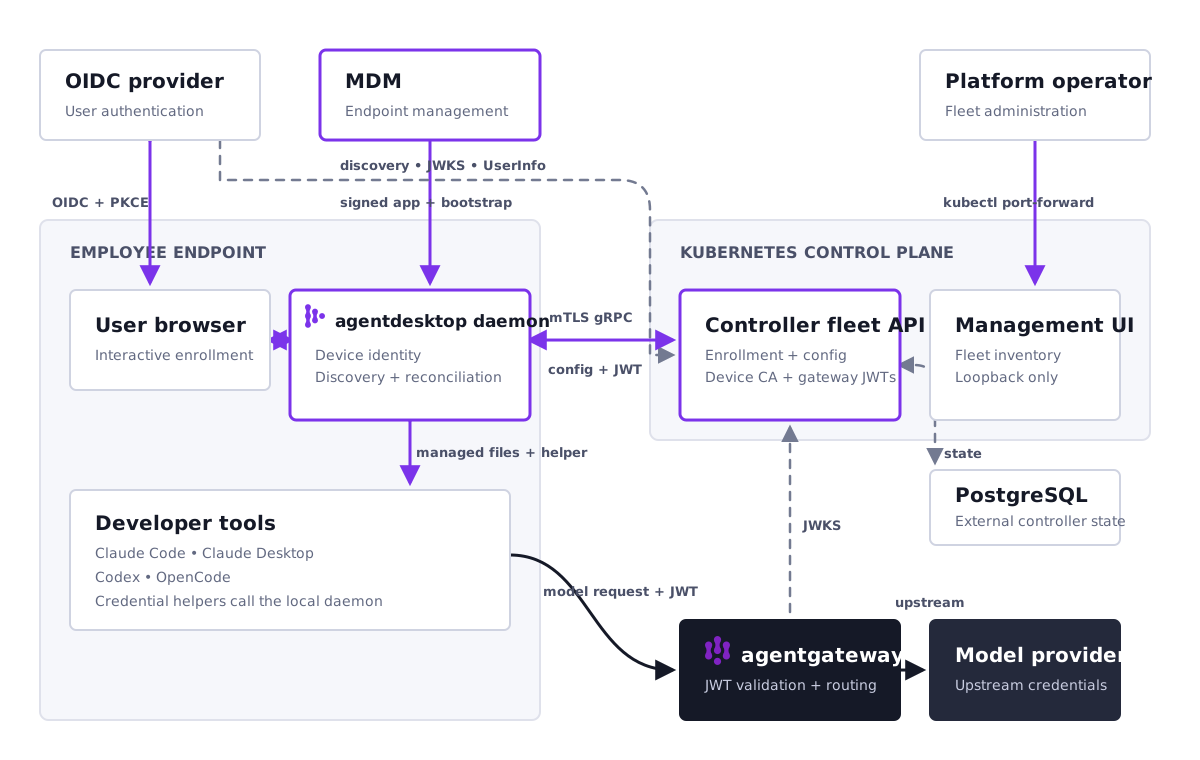
| Component | Responsibility |
|---|---|
| Identity provider | Authenticates the device user during enrollment. |
| Controller fleet API | Enrolls devices, issues device certificates, distributes desired configuration, and receives heartbeats and selected telemetry. |
| Controller management UI | Provides fleet inventory and configuration status through a loopback-only listener. |
| PostgreSQL | Stores controller state. |
| Inference gateway | Receives model traffic directly from supported developer tools. |
| Device daemon | Discovers tools, reconciles their managed configuration, and requests short-lived gateway credentials. |
| MDM | Installs the daemon and service, then writes its bootstrap configuration and any private trust roots. |
The fleet API uses TLS for server authentication. After enrollment, devices also present a controller-issued client certificate. Each daemon generates its device private key locally; only a certificate signing request is sent to the controller.
Developer-tool traffic does not pass through the controller. Claude Code, Claude Desktop, Codex, and OpenCode connect directly to the configured inference gateway. The controller only issues a short-lived gateway JWT when controllerJwt authentication is enabled.
Keep the two configuration layers separate:
- MDM writes a small, stable bootstrap file containing only the controller address, heartbeat interval, and optional private CA path.
- The controller distributes tool settings, gateway configuration, and telemetry policy as versioned daemon configuration.
Prerequisites
Before deployment, prepare:
- A Kubernetes cluster and a PostgreSQL database reachable from it. The GCP deployment templates can create both in GKE.
- A public DNS name for the fleet API, such as
agentdesktop.example.com. - An HTTPS OpenID Connect issuer and a public native client registration.
- A server certificate valid for the fleet API DNS name.
- A dedicated private CA for issuing device client certificates.
- An endpoint-management system capable of installing packages, writing root-owned files, and managing a background service.
- Optionally, an inference gateway and an RSA signing key for controller-issued gateway JWTs.
Do not use the development certificates generated by the repository examples. Keep the controller TLS private key, device CA private key, database credentials, and optional gateway signing key in your production secret manager.
1. Configure the OIDC client
Create a public native application in the identity provider. The daemon does not send a client secret.
Configure the client with:
- Authorization Code flow.
- PKCE with the
S256challenge method. - Exact redirect URI
http://127.0.0.1:51327/callback. - Scopes
openid,profile,email, andoffline_access. - ID tokens and refresh tokens enabled.
- A UserInfo endpoint that accepts the issued access token.
The controller requires the discovery document’s issuer value to exactly match oidc.issuer. Avoid a trailing-slash mismatch. Apply the organization’s MFA and device-access policy to this client, and limit access to users permitted to enroll endpoints.
Network requirements are:
- The controller must reach the issuer’s discovery document, JWKS, and UserInfo endpoints.
- The machine daemon must reach the controller and the OIDC token endpoint from its root or
SYSTEMservice context, including through any required service proxy. - The user’s browser must reach the authorization endpoint and return to the loopback callback.
- Loopback TCP port
51327must be available while the user completes enrollment.
The controller loads the identity provider’s JWKS when it starts. Restart the controller after an IdP signing-key rotation if the new key is not already in that loaded set.
Microsoft Entra ID
For a single-tenant Microsoft Entra deployment:
- Open the Microsoft Entra admin center, then go to Entra ID > App registrations > New registration.
- Name the app
agentdesktop enrollment, choose Accounts in this organizational directory only, leave the redirect URI empty, and select Register. - Record the Application (client) ID and Directory (tenant) ID. Do not create a client secret.
- Open Manifest and update the existing Microsoft Graph fields:
"isFallbackPublicClient": true,
"publicClient": {
  "redirectUris": [
    "http://127.0.0.1:51327/callback"
  ]
}
Do not add the legacy Azure AD Graph fields allowPublicClient or replyUrlsWithType; the current manifest editor rejects them. Leave web.implicitGrantSettings disabled because agentdesktop uses authorization code flow with PKCE, not implicit flow.
Limit who may enroll under Enterprise applications > agentdesktop enrollment > Properties by enabling Assignment required. Assigning individual pilot users is valid. Group-based enterprise-application assignment can depend on tenant licensing, but this identity assignment is separate from Intune software targeting.
Use the exact canonical issuer returned by discovery. Entra may accept the tenant domain in the request but return the tenant GUID in issuer:
curl --fail --silent --show-error \
  "https://login.microsoftonline.com/TENANT_ID_OR_DOMAIN/v2.0/.well-known/openid-configuration" |
  jq -r .issuer
Set OIDC_ISSUER to that output without changing it and set OIDC_CLIENT_ID to the Application (client) ID.
To create or converge the app registration with GA Azure CLI commands instead of editing the portal manifest, sign in to the target tenant and run the committed helper:
az login --tenant TENANT_ID
./deploy/gcp/scripts/create-entra-app.sh
The helper:
- creates or updates the app registration and its Enterprise Application;
- declares only the
openid,profile,email, andoffline_accessdelegated scopes; - configures the public loopback callback and enables Assignment required;
- creates no client secret; and
- prints the exact
OIDC_ISSUERandOIDC_CLIENT_IDexports.
Use --dry-run to inspect its commands without changing Entra.
Because Assignment required is enabled, a Global Administrator must grant tenant-wide consent for those four scopes before anyone can enroll:
az ad app permission admin-consent --id OIDC_CLIENT_ID
The same action is available under App registrations > agentdesktop enrollment > API permissions > Grant admin consent. Without it, Entra reports that agentdesktop needs permission that only an administrator can grant. Assign pilot users or groups to the Enterprise Application separately; the helper does not decide who is authorized to enroll. An unassigned user receives AADSTS50105.
2. Prepare certificates and signing keys
agentdesktop uses three independent key purposes. Do not reuse keys between them.
Fleet API server certificate
Obtain a server certificate whose SAN contains the exact externally resolved controller hostname. Store the leaf certificate followed by any intermediate certificates in controller.pem, and its unencrypted PEM private key in controller-key.pem.
The controller terminates TLS itself because it must receive the endpoint’s client certificate. Expose it through an L4 load balancer or TCP TLS passthrough. Do not terminate TLS at a normal HTTP ingress.
If the server certificate chains to a public or enterprise root already trusted by endpoints, omit controller.caCertificatePath from the MDM bootstrap. Otherwise, MDM must deploy the issuing CA as a protected PEM file and reference it explicitly.
Inspect the certificate before loading it:
openssl x509 -in controller.pem -noout \
  -subject -issuer -dates -ext subjectAltName -ext extendedKeyUsage
openssl pkey -in controller-key.pem -pubout -outform DER | openssl sha256
openssl x509 -in controller.pem -pubkey -noout |
  openssl pkey -pubin -outform DER | openssl sha256
The two SHA-256 values must match.
Device certificate authority
Create a dedicated issuing CA for agentdesktop device identities. Provide its PEM certificate as device-ca.pem and matching unencrypted PEM key as device-ca-key.pem. The certificate must be a CA certificate with certificate-signing key usage.
The controller keeps this key online because it signs enrollment CSRs. Use a dedicated intermediate or otherwise tightly scoped CA, store the source material in a secret manager, restrict access to the Kubernetes Secret, and audit every read. Do not use the organization’s general-purpose root CA.
The daemon generates its private key locally. The controller accepts only the verified public key from the CSR and assigns the device identity itself. Issued client certificates are valid for 30 days. Before opening each controller stream, the daemon reuses the local key to request renewal when the certificate has 24 hours or less remaining. This is an opportunistic connection-time check, not a scheduled timer. If a certificate expires before renewal succeeds, sign out locally and enroll again.
The current controller has one active device issuer and no staged CA-rotation workflow. Treat replacement of this CA as a coordinated re-enrollment event and test it on a pilot group first.
Gateway JWT signing key
This key is needed only when the controller issues inference-gateway credentials. Generate or provision an RSA private key in PKCS#8 or PKCS#1 PEM format as gateway-jwt-key.pem. The controller signs RS256 JWTs and publishes the public key at:
https://agentdesktop.example.com/.well-known/jwks.json
The default token lifetime is five minutes. The published JWKS contains one active key and is cacheable for five minutes. The controller provides no old-and-new key overlap, so direct signing-key rotation cannot be guaranteed zero-downtime. Either configure an overlapping verifier set with gateway-specific controls or schedule a brief interruption while old tokens expire and the gateway refreshes JWKS.
Create the Kubernetes TLS Secret
Prefer an external-secret controller that maps your secret manager’s values to the required keys. For an initial controlled deployment, create the Secret from protected local files:
kubectl create namespace agentdesktop

kubectl -n agentdesktop create secret generic agentdesktop-controller-tls \
  --from-file=controller.pem=/secure/path/controller.pem \
  --from-file=controller-key.pem=/secure/path/controller-key.pem \
  --from-file=device-ca.pem=/secure/path/device-ca.pem \
  --from-file=device-ca-key.pem=/secure/path/device-ca-key.pem \
  --from-file=gateway-jwt-key.pem=/secure/path/gateway-jwt-key.pem
Omit the gateway key when gateway JWT issuance is disabled. Delete protected local copies according to your key-handling policy after the secret manager has accepted them.
3. Prepare PostgreSQL
Create a dedicated database and role. The role must be able to run the controller’s built-in SQL migrations and read and write all tables in that database. Use encrypted PostgreSQL transport, for example a URL ending in sslmode=verify-full, and verify the database hostname against its certificate.
The controller opens a pool of up to 10 connections per process. Include that in connection-limit planning. Configure automated backups, restore testing, retention, and monitoring before enrollment begins.
Keep the complete database URL in the controller configuration Secret. Do not pass credentials in Helm values or place the URL in the chart-generated ConfigMap.
For GCP, follow the Deploy on Google Cloud walkthrough. It uses the
downloadable production deployment kit,
whose PostgreSQL chart follows kagent’s direct Deployment, PVC, PGDATA,
probe, security-context, and pgvector/pgvector:pg18-trixie pattern. It adds
generated credentials, verified TLS, a retained regional persistent disk,
NetworkPolicy, and daily pg_dump backups to a protected GCS bucket.
This remains a single database process with Recreate upgrades. Expect an outage while Kubernetes restarts the Pod or reattaches its disk. Use managed or operator-managed PostgreSQL instead when the required recovery-time objective needs automatic database failover.
4. Create controller and fleet configuration
Create a local controller.yaml for insertion into your secret manager:
fleetListen: 0.0.0.0:8443
adminListen: 127.0.0.1:8080
databaseUrl: postgresql://agentdesktop:REDACTED@postgres.example.com:5432/agentdesktop?sslmode=verify-full
tls: /etc/agentdesktop/tls
allowInsecureDev: false

oidc:
  issuer: https://login.example.com
  clientId: agentdesktop
  redirectUri: http://127.0.0.1:51327/callback

gatewayJwt:
  privateKey: /etc/agentdesktop/tls/gateway-jwt-key.pem
  issuer: agentdesktop-controller
  keyId: agentdesktop-2026-01
  lifetime: 5m

daemonConfig:
  path: /etc/agentdesktop/config/daemon.yaml
  revision: 1
Omit gatewayJwt if it is not used. adminListen must remain loopback; the controller rejects a non-loopback address.
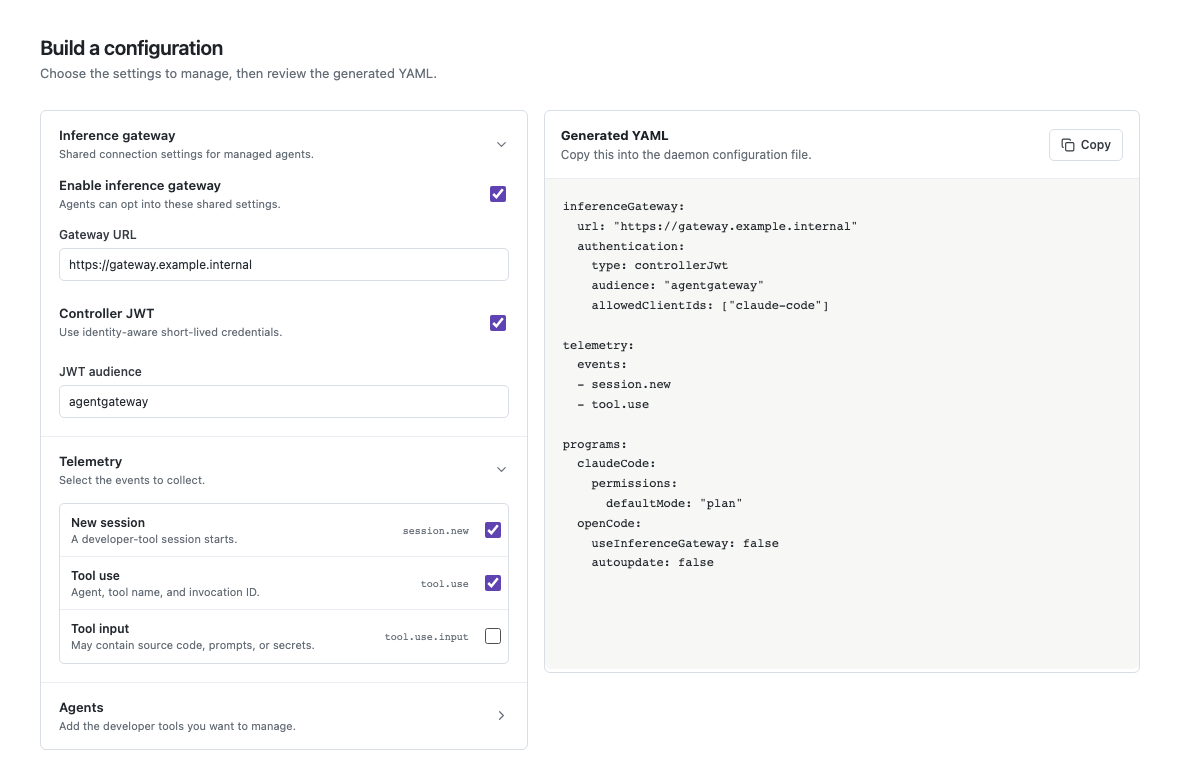
Next create daemon.yaml, the policy sent to enrolled endpoints:
inferenceGateway:
  url: https://gateway.example.com
  authentication:
    type: controllerJwt
    audience: agentgateway
    allowedClientIds:
    - claude-code
    - claude-desktop
    - codex
    - opencode

telemetry:
  events:
  - session.new
  - tool.use

programs:
  claudeCode:
    permissions:
      defaultMode: plan
    companyAnnouncements:
    - Managed by your organization

  claudeDesktop:
    isLocalDevMcpEnabled: false

  codex:
    managedConfig:
      model_reasoning_effort: high

  openCode:
    model: company-model
    models:
      company-model:
        name: Company model
Only list clients you intend to authorize in allowedClientIds. tool.use reports tool metadata. tool.use.input additionally sends tool arguments and can contain prompts, source code, paths, or secrets; complete a privacy and security review before enabling it.
Validate and preview this controller-distributed policy on a disposable representative endpoint before uploading it:
sudo agentdesktop daemon --config ./daemon.yaml --dry-run
The command does not write files. A pre-existing managed file that agentdesktop does not own is reported as a conflict.
The controller UI’s configuration builder generates YAML but does not save it. The watched daemon.yaml file remains the source of truth. Invalid replacements are rejected and the controller retains the last valid configuration.
Managed client behavior
When a tool is present in programs, the daemon reconciles its system-managed configuration. Gateway-generated settings take precedence over overlapping pass-through settings.
| Client | Generated gateway behavior |
|---|---|
| Claude Code | Sets ANTHROPIC_BASE_URL and installs an apiKeyHelper. |
| Claude Desktop | Selects the gateway inference provider and installs a credential-helper script. |
| Codex | Adds an agentdesktop Responses API model provider and credential command. |
| OpenCode | Adds an agentdesktop provider, selected model, and credential plugin. |
System-mode defaults include:
| Managed artifact | Default path |
|---|---|
| Claude Code on macOS | /Library/Application Support/ClaudeCode/managed-settings.d/50-agentdesktop.json |
| Claude Code on Windows | %ProgramFiles%\ClaudeCode\managed-settings.d\50-agentdesktop.json |
| Claude Code on Linux | /etc/claude-code/managed-settings.d/50-agentdesktop.json |
| Claude Desktop settings | /etc/claude-desktop/managed-settings.json |
| Claude Desktop credential helper | /etc/claude-desktop/agentdesktop-credential-helper |
| Codex | /etc/codex/managed_config.toml |
| OpenCode settings | /etc/opencode/opencode.jsonc |
| OpenCode credential plugin | /etc/opencode/plugins/agentdesktop.js |
agentdesktop marks files it owns and refuses to replace a conflicting file it did not create. Inventory existing management profiles and files before the pilot.
The current Windows service also receives the Unix-style /etc defaults for Claude Desktop, Codex, and OpenCode, and the MSI does not override them. Treat Windows managed paths as a production integration point. If the installed client expects another organization-managed location, customize the service arguments with --claude-desktop-managed-settings, --claude-desktop-credential-helper, --codex-managed-config, --open-code-managed-config, and --open-code-plugin, then test the resulting installer.
5. Install the controller
On GCP, download the deployment kit, run its local Kind smoke test, then follow the Deploy on Google Cloud walkthrough. It covers the complete infrastructure, image-build, Entra, certificate, installation, Intune, and pilot-enrollment sequence. It does not require a Cloud DNS zone. Cloudflare records must use DNS only because its normal proxy terminates the end-to-end TLS and client-certificate path.
Account for the chart’s policy-file mount
The current chart’s existingConfigSecret branch selects only controller.yaml. A production configuration that also references /etc/agentdesktop/config/daemon.yaml will therefore fail unless the chart is extended.
Maintain a small chart overlay that mounts every key from the existing config Secret. In templates/deployment.yaml, the existing-secret volume should be equivalent to:
- name: config
  secret:
    secretName: agentdesktop-controller-config
In other words, remove the items selection that projects only controller.yaml, or add a separate daemon-policy Secret volume. Keep this overlay in version control and rebase it when upgrading the chart.
Create the configuration Secret with both files:
kubectl -n agentdesktop create secret generic agentdesktop-controller-config \
  --from-file=controller.yaml \
  --from-file=daemon.yaml \
  --dry-run=client --output=yaml | kubectl apply -f -
Install a pinned chart version
Set VERSION to a reviewed release without a leading v. Pull the chart so you can apply the overlay:
export VERSION=0.1.0

helm pull \
  oci://ghcr.io/agentdesktop-dev/charts/agentdesktop-controller \
  --version "${VERSION}" \
  --untar --untardir ./vendor
Apply the overlay, then install:
helm upgrade --install agentdesktop \
  ./vendor/agentdesktop-controller \
  --namespace agentdesktop \
  --set replicaCount=1 \
  --set existingConfigSecret=agentdesktop-controller-config \
  --set tlsSecretName=agentdesktop-controller-tls \
  --set service.type=LoadBalancer \
  --set service.port=443
The published controller image tag is v${VERSION}. The packaged chart uses that version by default. Pin the version in deployment automation and verify the signed image according to your software-supply-chain policy. The chart itself is not signed; review it and mirror the approved artifact into a trusted registry.
Point agentdesktop.example.com at the load balancer. The external path must preserve TLS and HTTP/2 end to end. Configure a TCP health check when the load balancer cannot probe gRPC without terminating TLS.
The chart does not currently define readiness probes, a PodDisruptionBudget, NetworkPolicy, or provider-specific Service annotations. Supply those through your platform overlay where required.
Verify the controller
kubectl -n agentdesktop rollout status deployment/agentdesktop
kubectl -n agentdesktop logs deployment/agentdesktop

openssl s_client \
  -connect agentdesktop.example.com:443 \
  -servername agentdesktop.example.com \
  -verify_hostname agentdesktop.example.com \
  -verify_return_error \
  -alpn h2 </dev/null
Add -CAfile /path/to/controller-ca.pem when testing a private CA. Require a successful verification result and ALPN protocol: h2 in the output.
Look for successful OIDC initialization, database migrations, device certificate issuance, and both listeners in the controller logs. If gateway JWT issuance is enabled, verify the public key:
curl --fail --silent \
  https://agentdesktop.example.com/.well-known/jwks.json
The management UI has no separate application authentication layer and remains loopback-only. Restrict Kubernetes port-forward access with RBAC:
./deploy/gcp/scripts/port-forward-admin.sh
Then open http://127.0.0.1:18080. The helper binds only to IPv4 loopback, re-resolves the Ready controller Pod after a rollout, and reconnects when GKE closes a long-lived streaming session. Press Ctrl-C to stop it.
Pass another local port when needed, for example
./deploy/gcp/scripts/port-forward-admin.sh 28080, and open
http://127.0.0.1:28080. The public controller hostname serves the fleet API
on HTTPS 443, not this management UI; / may correctly return 404, and HTTP
port 80 is not required.
6. Configure the inference gateway
Skip this section when no inference gateway is used.
Configure the gateway to:
- Accept traffic at the exact URL in
inferenceGateway.url. - Validate RS256 JWTs against the controller’s public JWKS URL.
- Require issuer
agentdesktop-controllerand audienceagentgateway, or the values selected in your configuration. - Authorize the
client_idclaim for each supported developer tool. - Use the
sub,act.sub, email, and IdP claims only according to your reviewed authorization policy. - Keep upstream provider credentials at the gateway; never distribute them to endpoints.
The JWT contains the OIDC subject in sub, the device ID in act.sub, the requesting tool in client_id, and selected verified IdP claims. Test expiry, clock skew, JWKS refresh, and key rotation before rollout.
7. Deploy endpoints through MDM
The endpoint-management platform must:
- install the reviewed macOS PKG or per-machine Windows MSI in the machine context;
- write the controller bootstrap and optional private controller CA with restricted permissions;
- restart the service when managed content changes; and
- report package, service, and local daemon health.
The bootstrap and controller CA certificate are public configuration and trust material. Never distribute the device CA key, controller TLS key, gateway signing key, database URL, provider credentials, or any other secret through MDM.
Follow Deploy through Microsoft Intune for the complete macOS and Windows runbook. For Jamf Pro, Kandji, or Fleet, use the MDM integrations mappings.
8. Validate a pilot endpoint
Perform all of these checks before increasing the MDM assignment:
- Confirm the service survives a reboot and the local status command prints
ok. - Complete enrollment and verify the correct user, hostname, OS, architecture, and agent version in the controller UI.
- Confirm the configuration state becomes Applied at the intended revision.
- Restart the daemon after installing or removing developer tools, then run
agentdesktop discoverwith the installed binary. Discovery is a startup snapshot, not a live rescan. - Inspect the generated managed files and verify that unrelated user settings remain intact.
- Start each managed tool and confirm its model requests reach the inference gateway.
- Verify the gateway accepts a short-lived controller JWT and rejects an expired token, wrong audience, and unapproved client ID.
- Confirm only the selected telemetry events appear. Inspect payloads before enabling telemetry beyond the pilot.
- Disconnect the controller temporarily and confirm the daemon continues using its cached last accepted configuration.
- Test upgrade, rollback, unenrollment, and complete offboarding on both CPU architectures in use.
agentdesktop config prints the local MDM bootstrap, not the controller-distributed effective policy. Use the desktop UI’s advanced configuration view, the controller UI, or the protected remote-config.yaml in the daemon state directory when diagnosing remote policy.
9. Roll out and operate
Use deployment rings such as platform engineering, volunteer developers, one business unit, and then the general fleet. Gate each ring on enrollment success, configuration failures, gateway authentication failures, and support volume.
For each policy rollout:
- Validate
daemon.yamlagainst the schema in the source repository. - Run
agentdesktop daemon --config ./daemon.yaml --dry-runand review the generated changes on representative endpoints. - Increment
daemonConfig.revisionincontroller.yaml. - Scale the single-replica controller to zero and wait for its Pod to stop.
- Update the combined Kubernetes configuration Secret.
- Scale the controller back to one and wait for rollout completion.
- Watch Applied and Failed counts before expanding the ring.
kubectl -n agentdesktop scale deployment/agentdesktop --replicas=0
kubectl -n agentdesktop wait --for=delete pod \
  -l app.kubernetes.io/instance=agentdesktop --timeout=120s

kubectl -n agentdesktop create secret generic agentdesktop-controller-config \
  --from-file=controller.yaml \
  --from-file=daemon.yaml \
  --dry-run=client --output=yaml | kubectl apply -f -

kubectl -n agentdesktop scale deployment/agentdesktop --replicas=1
kubectl -n agentdesktop rollout status deployment/agentdesktop
This brief stop avoids publishing new policy with the old revision: a running controller watches daemon.yaml, but its revision is fixed when the process starts. A live invalid policy replacement retains the last valid policy; an invalid file present during startup prevents the controller from starting, which is why the dry run comes first. Controller startup configuration, certificates, OIDC JWKS, and signing keys are also loaded at process start.
Backup and recovery
Back up PostgreSQL and the source values in the secret manager. A replacement controller needs the same database, server identity, device CA, and gateway signing key to preserve normal connectivity. Test restoration into an isolated environment.
The GCP deployment runs a daily PostgreSQL 18 custom-format dump and uploads it, with a SHA-256 file, to the retention-protected bucket using Workload Identity. Run ./deploy/gcp/deploy.sh backup before a risky change. A backup is useful only after a tested restore: scale the controller to zero, suspend scheduled backups, restore with the matching PostgreSQL major version, restart the controller, and run deployment verification before admitting endpoints.
Do not restore endpoint state to another machine. Device private keys are machine identities and must be generated locally through a new enrollment.
Rotation
- Server certificate: update
controller.pemandcontroller-key.pem, then restart the controller before expiry. - OIDC signing keys: restart the controller after the IdP publishes a key not present when the controller started.
- Gateway JWT key: the current JWKS exposes one key with five-minute caching and no overlap. Use gateway-specific overlapping verifier controls or schedule an authentication interruption while tokens and caches expire, then change
keyId, update the key, and restart the controller. - Device CA: plan a fleet re-enrollment and local sign-out. The current controller does not provide overlapping issuer rotation.
Device removal and offboarding
Deleting a device in the management UI makes future authenticated RPCs and reconnections fail, but it does not synchronously close an established stream or revoke a gateway JWT already issued for up to its configured lifetime. An otherwise authorized user can also enroll again. Permanent offboarding therefore requires removing IdP access, withdrawing MDM policy, and stopping or remediating the endpoint.
The Windows MSI preserves machine configuration, and the macOS PKG has no uninstall command. Removing the state directory alone does not delete private keys and OAuth tokens from macOS Keychain or Windows Credential Manager. Removing the installed application also does not remove agentdesktop-owned tool settings, helper scripts, or plugins.
For complete offboarding:
- Remove the user’s IdP entitlement and withdraw the endpoint’s MDM assignment.
- While the daemon and its identity metadata still exist, use Sign out in Agent Desktop. This deletes the native credential-store entries and local identity.
- Stop the service. Apply an empty standalone configuration once with
agentdesktop daemon --config ./empty.yaml --onceso the reconciler removes files it owns. - Uninstall the service and application, then remove the machine configuration, private CA copy, and state directory with a privileged MDM action.
- Delete the device in the controller UI and allow the maximum gateway JWT lifetime to elapse.
- Confirm the gateway no longer accepts credentials for that device.
On macOS, run step 3 through MDM as root:
launchctl bootout system/dev.agentdesktop.daemon
printf '{}\n' > /private/tmp/agentdesktop-empty.yaml
"/Applications/agentdesktop.app/Contents/MacOS/agentdesktop" daemon \
  --config /private/tmp/agentdesktop-empty.yaml --once
rm -f /private/tmp/agentdesktop-empty.yaml
On Windows, run it through MDM or an elevated PowerShell session:
Stop-Service AgentDesktop
$empty = Join-Path $env:TEMP "agentdesktop-empty.yaml"
[IO.File]::WriteAllText($empty, "{}`n", [Text.UTF8Encoding]::new($false))
& "$env:ProgramFiles\Agent Desktop\agentdesktop.exe" daemon `
  --config $empty --once
Remove-Item $empty -Force
If local sign-out cannot run, the current product has no privileged purge command for orphaned Keychain or Credential Manager entries; handle those through platform credential-store remediation or device reimaging.
Troubleshooting
| Symptom | Check |
|---|---|
| TLS hostname or trust failure | Certificate SAN, full intermediate chain, endpoint clock, DNS, and caCertificatePath. |
| Enrollment RPC fails behind a load balancer | Confirm L4 TLS passthrough and HTTP/2; the controller must terminate TLS and see the client certificate. |
| OIDC initialization fails | Exact issuer match, HTTPS discovery, JWKS and UserInfo reachability, and public-client configuration. |
| agentdesktop needs admin permission | Grant tenant-wide consent for openid, profile, email, and offline_access. |
AADSTS50105 | Assign the user or an approved group to the enrollment Enterprise Application. |
| Entra reports App launch failed for an unexpected app ID | Compare the browser app ID with the client ID in the live controller Secret. The issuer tenant and client registration must match; reinstall the controller configuration when they do not. |
| Enrollment page expired or UI remains unavailable | Restart the machine daemon to create a new 10-minute enrollment attempt. |
| Device certificate expired before renewal | Use Agent Desktop to sign out locally, restart the daemon, and enroll again; do not only delete the state directory. |
| Desktop UI cannot reach the macOS daemon | Check the agentdesktop group, socket permissions, and whether the user signed in again after group assignment. |
Controller cannot find daemon.yaml | Apply the existing-config Secret chart overlay and confirm both files are mounted under /etc/agentdesktop/config. |
| Managed file conflict | Remove or migrate the pre-existing system-managed file; agentdesktop will not overwrite a file it does not own. |
| Gateway returns 401 | Compare JWT iss, aud, client_id, expiry, gateway clock, and the configured JWKS URL. |
| Configuration stays failed | Read the per-device error in the controller UI and verify paths, permissions, and tool-specific setting types. |